Quick installation
Install your eSIM in minutes, on iPhone or Android
Follow the guided timeline, switch between platform visuals, and complete activation with fewer setup mistakes.
The Process
Four simple steps to get you online.
1.Check phone compatibility
First, make sure your phone supports eSIM. Go to your mobile settings to verify.
- Your phone must support eSIM technology
- iOS 12.1 or later / Android 10 or later required
- Phone must be unlocked from your carrier
2.Receive and scan QR code
After purchase, a QR code will be sent to your email. Scan it with your phone camera.
- Ensure a stable internet connection
- Scan the code in a well-lit environment
- Keep your phone camera lens clean
3.Install eSIM profile
After scanning, follow the on-screen installation steps. Enter the confirmation code if prompted.
- Follow all prompts to completion
- Do not interrupt the installation process
- Restart your phone if necessary
4.Activation and usage
Once installed, activate the eSIM from your settings menu and configure your data settings.
- Enable Data Roaming for the new eSIM
- Set the eSIM as the primary data line
- Only one eSIM can be active for data at a time
Visual Guide
Select your operating system
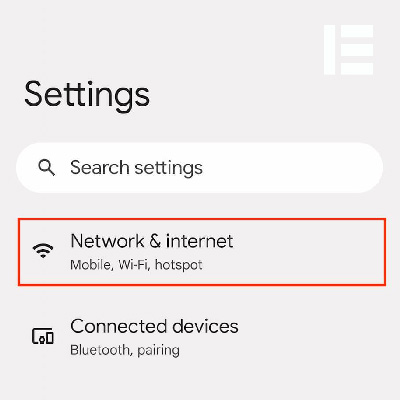
Connect your device to a stable Wi-Fi network.
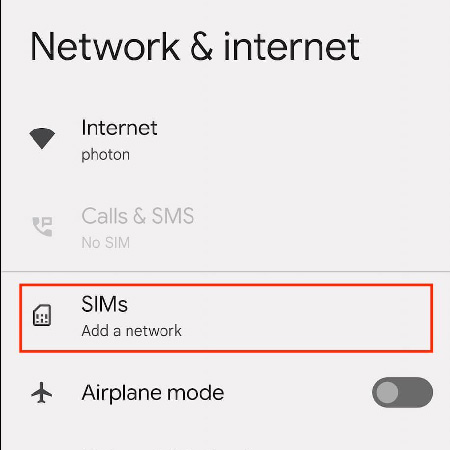
Open Settings and select the "Connections" menu.
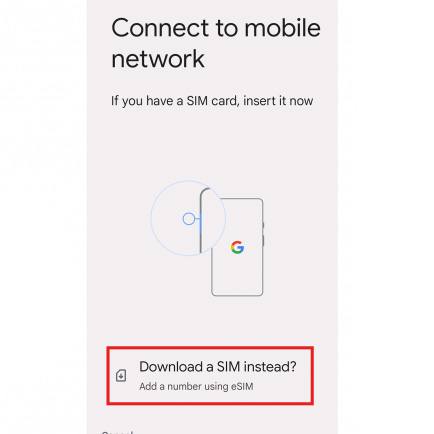
Navigate to SIM Card Manager > Add Mobile Plan > Add Using QR Code.
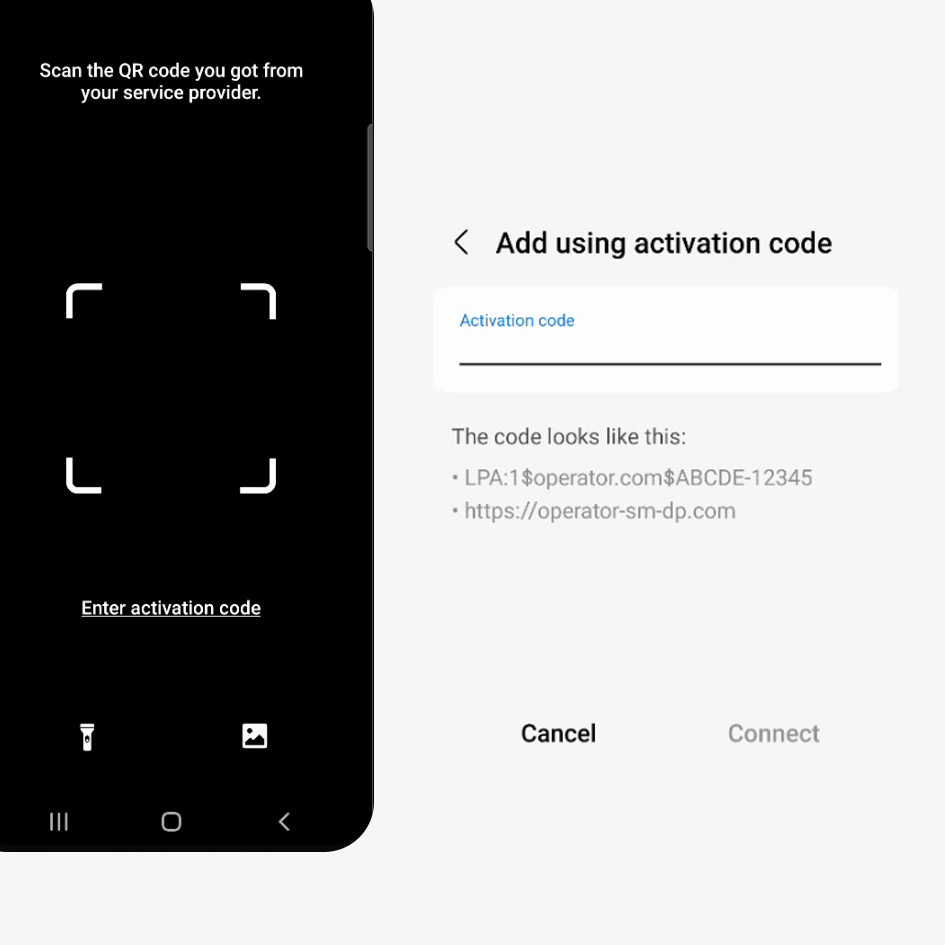
Scan the QR code from your email and confirm to install.
Supported Devices
Ensure your smartphone supports eSIM technology before purchasing a plan.

Apple
- iPhone 15 Pro / Pro Max
- iPhone 15 / Plus
- iPhone 14 Pro / Pro Max
- iPhone 14 / Plus
- iPhone 13 / Pro / Pro Max
- iPhone 12 / Pro / Pro Max
- iPhone 11 / Pro / Pro Max
- iPhone XS / XS Max / XR
- iPad Pro / Air / mini (Cellular)

Samsung
- Galaxy S24 / S24+ / S24 Ultra
- Galaxy S23 / S23+ / S23 Ultra
- Galaxy S22 / S22+ / S22 Ultra
- Galaxy S21 / S21+ / S21 Ultra
- Galaxy Z Fold 5 / 4 / 3
- Galaxy Z Flip 5 / 4 / 3
- Galaxy Note 20 / 20 Ultra

- Pixel 8 / 8 Pro
- Pixel 7 / 7 Pro / 7a
- Pixel 6 / 6 Pro / 6a
- Pixel 5 / 5a
- Pixel 4 / 4 XL / 4a 5G
- Pixel 3 / 3 XL (Limited)

Other Brands
- Huawei P40 / P40 Pro
- Oppo Find X5 / X5 Pro
- Oppo Find X3 Pro
- Motorola Razr / Edge+
- Sony Xperia 1 IV / 10 IV
- Sony Xperia 5 IV
- Xiaomi 13 Pro / 12T Pro
Important Compatibility Notes
- •Some older models may require the latest software updates to enable eSIM.
- •Carrier-locked phones will not work with third-party travel eSIMs.
- •iPhone models manufactured for Hong Kong, Macau, and Mainland China do not support eSIM.
- •To utilize data, the phone must be compatible with 4G/LTE or 5G frequency bands of the destination.
- •Some countries may have local telecommunications restrictions on eSIM usage.
Still need help?
Our technical support team is available 24/7 to guide you through the setup process or answer any questions you might have.