Loading homepage

Pick a channel, follow the install steps for your phone, or scan the quick fixes — most problems are solved before you need to message anyone.
Each channel is good at something different. Have your order reference ready and the first reply usually resolves it.
Telegram bot
@esimtrip_bot
Buying, re-sending your QR code, top-ups and order history.
Refunds, billing and anything that needs screenshots or an order ID.
Telegram channel
@esimtrip
Coverage news, new destinations and release notes.
Follow along
Before you message
Handy when you land somewhere with no data and only messaging works — the bot sells, re-sends QR codes, and tops up without a browser.
eSIMTrip Telegram BotNew
@esimtrip_bot
Works on Telegram for iOS, Android, desktop, and web.
Pick your platform — the steps below match what you will actually see on screen. For screenshots and edge cases, open the full guide.
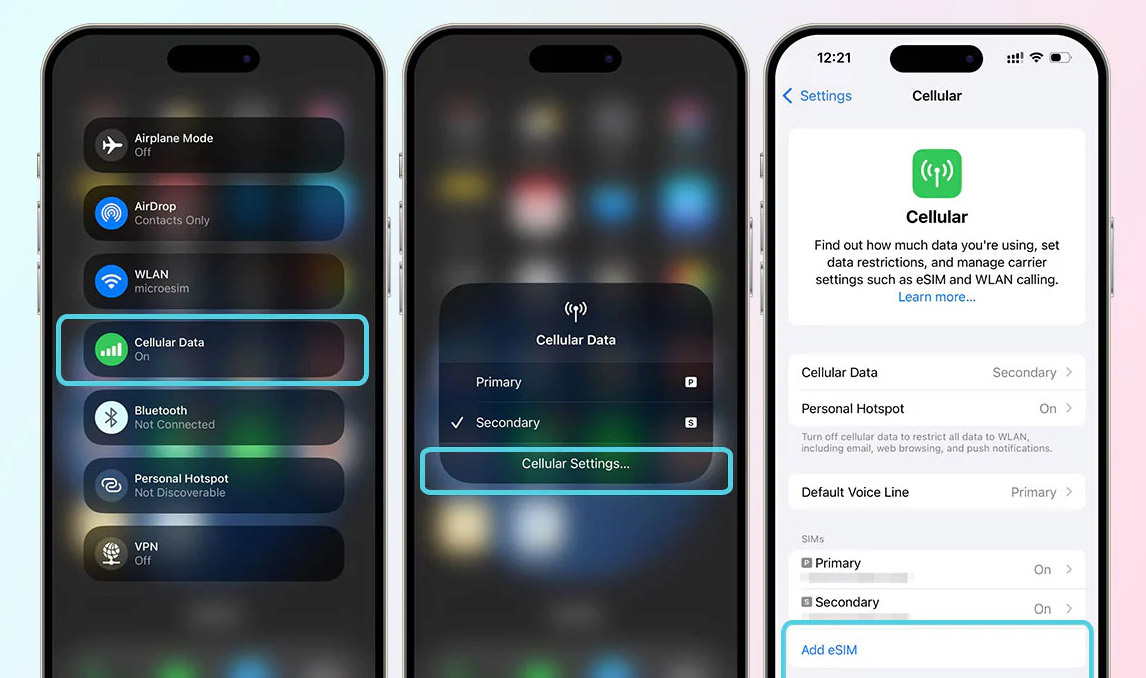
Open Settings → Cellular
Some regions label it Mobile Data. Both lead to the same screen.
Tap Add eSIM or Add Cellular Plan
On iOS 17 and later this sits under the list of existing plans.
Scan the QR code from your order
Point the camera at the code we emailed you, or tap Enter Details Manually.
Label the plan and turn on Data Roaming
Name it after your trip, set it as your Cellular Data line, and enable Data Roaming — the eSIM needs it abroad.
Labels vary slightly by iOS version and region.
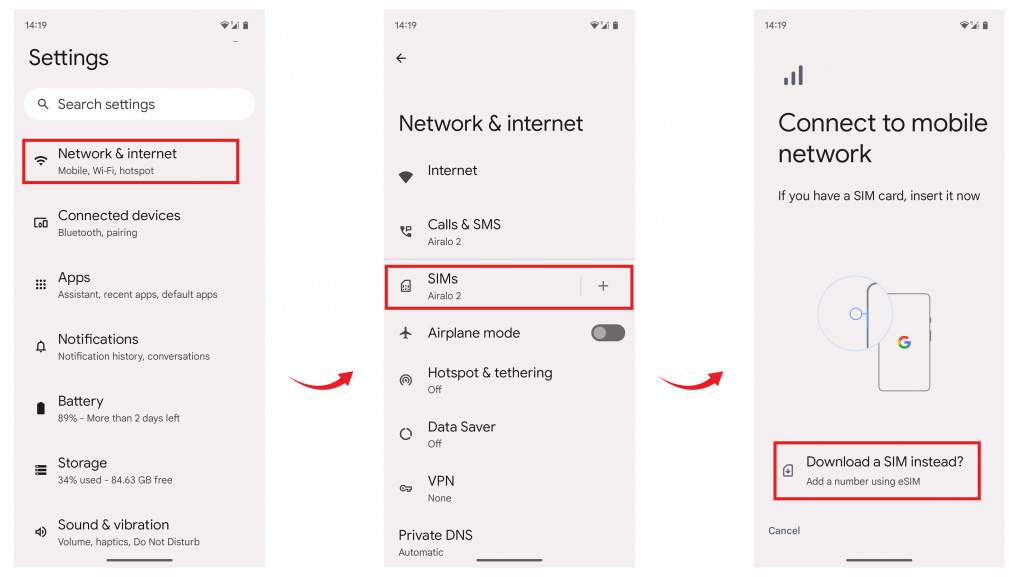
Open Settings → Network & Internet
Samsung calls this Connections; Pixel keeps it under Network & Internet.
Go to SIMs or Mobile network
Then tap the + next to SIMs, or Add more on Samsung.
Choose Add eSIM or Download a SIM instead
Scan the QR code from your order when the camera opens.
Enable the profile and Data Roaming
Switch the new SIM on, set it as your mobile data SIM, and allow roaming in its settings.
Exact paths depend on manufacturer and Android version.
Need more detail?
The complete setup guide walks through every screen with visuals.
These five cover almost every ticket we receive. Try the fix first — if it still fails, send us the order ID and a screenshot.
The QR code will not scan
Install over Wi-Fi with the code shown on another screen, or use the manual SM-DP+ address and activation code from your order email.
eSIM installed but no data
Turn on Data Roaming for the eSIM profile, set it as the mobile data line, then toggle Airplane mode once.
Stuck on “Activating” or no signal
Restart the device, then pick a network manually in Settings → Cellular → Network Selection. First registration can take a few minutes on landing.
“Cannot add cellular plan”
The QR code has already been used, or the device is carrier-locked. Check Carrier Lock reads “No SIM restrictions”, then message us with your order ID.
Data ran out mid-trip
If the plan supports top-ups, add data from the Telegram bot or your order page without reinstalling the profile. Otherwise, purchase a replacement plan.
Search by keyword or filter by topic. Expand a card to read the answer — everything stays on this page.
12 answers
An eSIM is a digital SIM that connects you to mobile networks without a physical card. It is built into most smartphones released in the last few years.
Yes. Our Telegram bot, @esimtrip_bot, lets you browse plans, pay, and receive your QR code without leaving the chat. It works on Telegram for iOS, Android, desktop, and web, and orders made through the bot are the same eSIMs sold on the website.
After purchase you receive a QR code and activation instructions. Scan the QR code, follow the prompts, and your eSIM is active in minutes.
Many recent phones support eSIM. Open your cellular settings and look for “Add eSIM” or a similar option, then use our compatibility checker to verify the specific model and regional variant before purchase.
Usually under five minutes. Activation details arrive immediately after purchase, and the profile registers on the local network shortly after you land.
Yes. Most eSIM-capable phones store several profiles, though typically only one is active for data at a time. Your home SIM can stay in place for calls and texts.
Installing at home over reliable Wi-Fi is usually convenient. Many plans start counting from their first supported-network connection at the destination, but activation rules vary, so check the individual plan before installing.
Where the plan supports top-ups, you can add data from the Telegram bot or your order page without reinstalling the profile. Otherwise, you can purchase a replacement plan.
Unused eSIMs that could not be installed are refundable under our refund policy. Message us with your order ID and a screenshot of the error and we will sort it out.
Our plans are data-only. Keep your home SIM active for calls and SMS, or use internet calling over the eSIM data connection.
Check the quick fixes above first — they resolve most cases. If the problem persists, contact us on any channel on this page with your order reference and we will pick it up.
The Telegram bot handles orders, QR re-sends, and top-ups at any hour. A human replies to email within the hour on business days.
 Get help on Telegram